


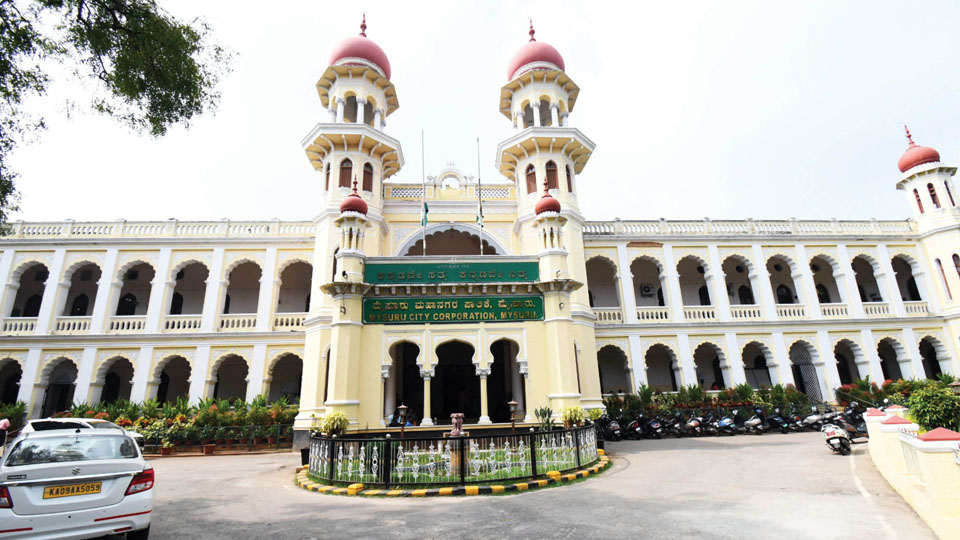
Mysore/Mysuru:The Mysuru City Corporation (MCC) has uploaded the draft e-Khata, which is now accessible to the public on www.eaasthi.karnataka.gov.in.
On visiting the website, the user must choose the district and local body name from the options and later enter the owner name/assessment number/khata number/reference number to find draft details of the property.
After checking the details, the owners can rectify the mistakes (if any) by uploading relevant documents. The owners have been provided with the provision of logging on to the website through their respective mobile numbers through OTP.
In case of owners already having procured the e-Khata from MCC, they should click on ‘YES’ and proceed for further approval.
In case of not being issued with e-Khata previously by the MCC, the owner must click ‘NO’ after logging to the website and later check the Ward Number/Block Number/Road Number, Name/Assessment Number/Khata Number already mentioned in the website and do the needful correction (if any) and click on ‘SAVE’ to proceed further.
Later, in the Property Type column, the owners must choose within the options Site/Building/ Multi-Owner Building/Apartment and select based on the availability of UGD and corner site (In case of the property being a building/multi-owner building/apartment), the approved SOP will be followed.
Steps to be followed depending on the date of property registration
A. If the registration date is after 01.4.2004, the registration number must be entered, following which the document number must be entered and must be validated in KAVERI software. After validation and saving, the measurement of the property will be made available as per the registration document through the KAVERI software.
B. The Form-15 number secured through the Document Number must be entered for validation. (The latest computerised Encumbrance Certificate (EC) should be secured one day before the registration).
C. If the registration date is before 01.4.2004, ‘Ownership Supporting Documents’ must be uploaded by selecting the prescribed tab. (Handwritten EC form from the date of registration till 13.03.2004 and the latest computerised EC from 01.4.2004 can be uploaded).
After validating the details of the property owner and transactions in the property owner column, the validation of the property will be done through do-eKYC (Aadhaar) after sending the OTP to the registered mobile number.
In case of property being transferred, the transfer of ownership details has been provided through the mutation process.
Details of property users (optional) can be entered.
Upload a property photograph
In the property location column, the photograph of the property should be uploaded by selecting the Google Maps option and entering GPS Co-ordinates (Longitude and Latitude) (.jpg Format, Size <200KB) to continue.
The details of the property, including chakbandi (land consolidation) is also made available on the website with a provision to make corrections if needed. If the property is located on the odd-sized land, its measurements should be mentioned.
In case of a vacant site, a suitable column must be selected to proceed further.
In the property classification (site), the documents related to the property must be uploaded to proceed.
Verifier and approver logins
In case the name of the property owner does not match, a suitable reason must be selected before uploading the documents. (However, the final validation will be done only after being verified through the VERIFIER and APPROVER logins from the documents available in the Urban Local Bodies.) The application for khata will be submitted only after the final validation of all details related to the property.
After the application is received through the VERIFIER login, the application will be forwarded to the APPROVER login to either approve/reject the application. In case of rejection, a suitable reason will be mentioned.
The APPROVER login has been authorised to approve/reject the application.
On the application being approved, the owners have been provided the option to download the khata by logging on to http://eaasthi.karnataka.gov.in after payment of prescribe fees.
In case of the application being rejected, the owners have been provided another opportunity to submit a fresh application with correct information and details to secure Form-2.
Mysuru City Corporation (MCC) Commissioner Shaikh Tanveer Asif, in a press release has urged citizens residing within MCC limits to visit the e-aasthi website to examine details mentioned in the DRAFT KHATA and procure the Forum-2 after uploading all required documents.
Recent Comments